
- 4E, No.3 Shenfeng Road, Liuyao Community, Henggang Street, Longgang District, Shenzhen,China
- cc.shen@xypltd.com
- Call: +86 15112667855
News
Remote hardware system using LabsL and Prism4
- 2026-10-16
In the field of education and training, remote laboratories or remote hardware systems are hardware and software systems that allow students to access real devices in other places on the Internet. Remote laboratory can also be referred to as remote access laboratory or network laboratory. Students or trainees usually only need to use a web browser to access devices from anywhere in the world at any time.
For example, in the FPGA remote laboratory, students can control a real FPGA (in this case, a DE1 SoC with Altera FPGA). They can write HDL code, perform online synthesis, and then send the design to a remote FPGA laboratory available on the LabsLand network. Subsequently, students can interact in real-time with FPGA and observe the circuit board and experimental output through real-time video streaming
(Image source: Pablo Ordu ñ a)
FPGA is a real existence that students can interact with in real-time using a web browser.
History of Remote Laboratories
Since the mid-1990s, many such systems have appeared in literature, as well as various initiatives involving remote engineering, chemistry, physics, robotics, biology, and other laboratories. Since then, people have been designing open-source software solutions such as LabDiscoveryEngine/WebLab Dusto, iLab, Labshare, or RexLab to build remote laboratory software on top of them.
However, in terms of hardware, most remote laboratories are built from scratch. This leads to solutions that are not sustainable and scalable, and are time-consuming and costly, thus hindering universities from creating their own laboratories.
What is Prism4?
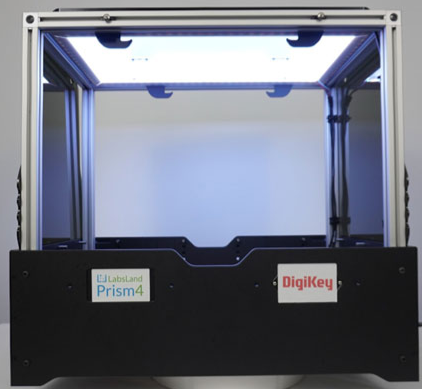
LabsLand Prism4 is a new product of LabsLand and DigiKey. This is a modular software and hardware product that can serve as a framework for creating and deploying remote laboratories. Its modular structure includes cameras, lighting systems, modular power management systems, light diffusion systems, and light curtains. These components together create a highly customizable remote laboratory installation environment. For example, the following is a photo of an empty LabsLand Prism4 without front and backlight curtains:
(Image source: Pablo Ordu ñ a)
Prism4 can be used independently, providing a clean canvas for researchers to create their own remote laboratories, and can also collaborate with LabsLand to create customized solutions. LabsLand Prism4 can also be provided together with existing Prism4 hardware systems. For example, in the DE1-SoC example above, the Prism4 hardware system is equipped with two Phase Dock workbenches (excluding FPGA) and an oscilloscope, VGA supporting 4 FPGAs, audio support, and more features:
(Image source: Pablo Ordu ñ a)
Installing the Prism4 hardware system in Prism4 is very simple: insert 4 cables from the workbench into Prism4, complete software registration, and you can use the remote laboratory.
The following figure shows the complete Prism4 equipped with 4 DE1 SoCs at the ECEDHA 2024 conference:
(Image source: Pablo Ordu ñ a)
For teachers or trainers interested in using remote laboratories
Option 1: Purchase a license.
For instructors and trainers who wish to immediately access and use remote laboratories, it can be easily achieved by purchasing licenses from DigiKey. The license includes access to various laboratories in the LabsLand network, such as DE1-SoC FPGAs, STM32 boards, Arduino robots, and circuit boards or electronic products. No hardware is required, students can also purchase access permissions. LabsLand will create an institutional space for the organization, through which students can access the plan.
Option 2: Purchase your own Prism4.
In addition, guidance personnel can also purchase Prism4 architecture and install it in their own facilities. Compared to only purchasing licenses, this solution has the following advantages:
Students can prioritize the use of their own devices, and in addition, they can also use other similar devices on the LabsLand network,
Students can see the logo of their school,
Students can also customize laboratories.
Both options include various peripherals for the laboratory, as well as integration and analysis with learning management systems such as Canvas, Blackboard, or Moodle.