
- 4E, No.3 Shenfeng Road, Liuyao Community, Henggang Street, Longgang District, Shenzhen,China
- cc.shen@xypltd.com
- Call: +86 15112667855
News
Quick Start to Windows on Arm Development
- 2026-10-16
In application fields such as industrial automation and healthcare, most existing infrastructure is based on Windows. If developers want to develop low-power, low-cost edge devices for these fields, Windows on Arm ® It is an obvious choice because the system can introduce the Windows platform into an efficient Arm architecture.
However, a major challenge when creating Windows on Arm systems is the lack of suitable development kits. Although operating systems (OS) have long been applied to various circuit board level Internet of Things (IoT) and embedded computing systems, these products typically require a significant amount of hardware engineering before coding begins.
Developers need a box type PC solution that comes pre installed with Windows on Arm and integrates all the components required for application development work. This will reduce setup time and complexity, allowing developers to focus on application development and testing without worrying about initial software installation and configuration issues.
This article explains the operating system selection criteria that drive the adoption of Windows for Arm and reviews the different Windows versions that can be considered. Subsequently, the article introduces Advantech's EPC-R3720IQ-AWA12 Windows on Arm development kit and explains how it provides a seamless environment to accelerate development. This includes introductory tips and indicates Microsoft tools that can be used with the suite.
Why use Windows instead of Linux or RTOS?
When choosing an operating system, developers have many options, including Linux and various real-time operating systems (RTOS). As for why Windows is chosen over these alternative solutions, a common reason is that Windows provides a large amount of software and libraries. For environments using traditional Windows infrastructure, this is a crucial consideration.
In addition, Windows also provides a mature development ecosystem, as well as Visual Studio and Comprehensive tools and application programming interfaces (APIs) such as the. NET framework. Programmers can choose from a wide range of programming languages such as C++, Python, and Node.js, as well as access various services of Microsoft Azure to quickly build complex features.
Linux also offers some of the aforementioned advantages, but configuring and maintaining Linux build versions may require significant effort. In addition, there may be significant differences in Linux distributions, which can pose challenges to the development process.
Unlike Windows and Linux, real-time operating systems (RTOS) emphasize efficiency. They often lack advanced features such as the rich graphical user interface (GUI) and extensive ecosystem provided by full-featured operating systems.
Ultimately, if developers need an operating system that is robust, feature rich, secure, and has a mature development ecosystem, then Windows is an extremely attractive choice. However, Windows offers multiple forms, and understanding the differences between them is crucial.
Understand Windows Options
Microsoft offers a variety of different Windows systems. Table 1 shows some of the main differences between different versions. For EPC-R3720IQ-AWA12, Advantech has chosen Windows IoT Enterprise. One of the advantages of Windows IoT Enterprise is its compatibility with touch screen friendly Universal Windows Platform (UWP) and traditional Win32 applications. With this flexibility, developers can choose the application model that best suits their needs.
Windows Pro Windows IoT Enterprise Windows IoT Core
Target devices include desktop computers, laptops, and tablets with full functionality, such as simple human-machine interface devices and headless applications
A complete graphical user interface with locking options. No graphical user interface
The application supports Win32, UWP Win32, UWP single UWP application
License Standard Business License OEM Agreement, Exclusive License Free for Personal Use, OEM Agreement
Limited customization, high-level customization, limited customization
Support for regular lifecycle updates and limited support for Long Term Service Channel (LTSC) options
Table 1: Different versions of Windows support unique use cases. (Table source: Kenton Williston, based on Microsoft information)
In addition, Windows IoT Enterprise also provides advanced security features to improve reliability:
The device lock function allows administrators to restrict devices to only run authorized applications.
Secure boot ensures that the device only starts using trusted software.
BitLocker encryption technology helps protect sensitive data.
The operating system also provides enterprise level management tools that can provide centralized support for deployed devices. These tools simplify the maintenance and security work of large-scale IoT deployments.
Many of the above features are not supported in the more compact Windows IoT Core. This version is suitable for lightweight single purpose devices with limited resources. It eliminates features such as graphical user interface and does not support traditional Win32 applications, making it more suitable as a supporting operating system for complex devices.
On the contrary, standard Windows Pro offers a rich feature set, but cannot be customized for IoT deployment. In addition, the standard version does not provide LTSC support for long-life devices.
Why use Windows on Arm?
In the past, the Windows operating system was dependent on the x86 architecture. Nowadays, the operating system can also run on Arm processors, and this choice opens up new design possibilities.
The main advantage of Windows on Arm is efficiency. Arm processors are known for their low power consumption, making them ideal for battery powered devices and applications with high thermal management requirements. Arm based systems also tend to emphasize cost-effectiveness, making them an attractive choice for large-scale IoT deployment.
Windows on Arm Development Kit Quick Start
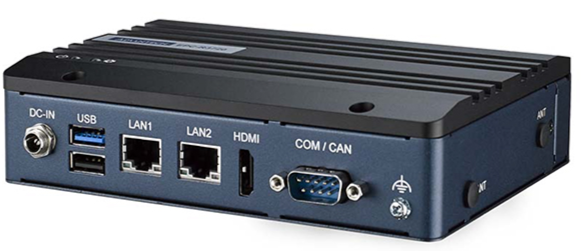
As mentioned above, one of the drawbacks of Windows on Arm is the lack of readily available hardware. EPC-R3720IQ-AWA12 solves this problem by providing a box PC pre installed with Windows 10 IoT.
As shown in Figure 1, the development kit is packaged in a sturdy casing measuring 174 x 108 x 25 mm. This casing can accommodate mounting brackets and can be deployed on-site as needed.